
Last updated on
Nov 9, 2026

MassMutual F9700 2019-2026 free printable template
pdfFiller is not affiliated with any government organization

Fill out
Complete the form online in a simple drag-and-drop editor.

eSign
Add your legally binding signature or send the form for signing.

Share
Share the form via a link, letting anyone fill it out from any device.

Export
Download, print, email, or move the form to your cloud storage.
Why pdfFiller is the best tool for your documents and forms


End-to-end document management
From editing and signing to collaboration and tracking, pdfFiller has everything you need to get your documents done quickly and efficiently.
Accessible from anywhere
pdfFiller is fully cloud-based. This means you can edit, sign, and share documents from anywhere using your computer, smartphone, or tablet.
Secure and compliant
pdfFiller lets you securely manage documents following global laws like ESIGN, CCPA, and GDPR. It's also HIPAA and SOC 2 compliant.
What is MassMutual F9700
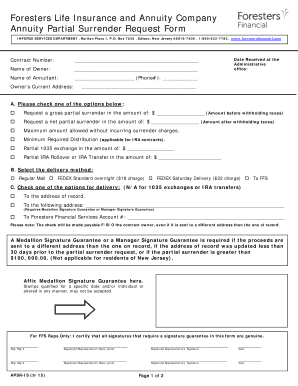
The Annuity Partial Withdrawal Form is a financial document used by annuity contract holders to request partial withdrawals from their contracts effectively.
pdfFiller scores top ratings on review platforms




Who needs MassMutual F9700?
Explore how professionals across industries use pdfFiller.

MassMutual F9700 is needed by:
-
Annuity contract holders looking to make partial withdrawals
-
Financial advisors assisting clients with annuity management
-
Tax professionals advising on withdrawal implications
-
Individuals in Massachusetts with MassMutual annuity contracts
-
Estate planners managing client annuity assets
Comprehensive Guide to MassMutual F9700
What is the Annuity Partial Withdrawal Form?
The Annuity Partial Withdrawal Form is a specialized document utilized by annuity contract holders seeking to make partial withdrawals from their contracts. This form is primarily employed by individuals who retain ownership of an annuity yet wish to access a portion of their funds without entirely withdrawing the contract. The form plays a crucial role in the withdrawal process by formally documenting the request for a partial withdrawal and ensuring compliance with the terms of the contract.
Purpose and Benefits of the Annuity Partial Withdrawal Form
This form facilitates accessing funds while keeping the overall annuity intact, which can be advantageous for immediate financial needs. Through the use of the Annuity Partial Withdrawal Form, owners can manage their finances effectively by selecting specific amounts to withdraw. Additionally, it's important to briefly consider the potential tax implications that could arise from such withdrawals.
Eligibility Criteria for the Annuity Partial Withdrawal Form
To utilize the Annuity Partial Withdrawal Form, certain criteria must be met. An owner of an annuity contract must fulfill specific conditions set forth by the issuing company, particularly in the case of MassMutual annuities. Requirements for submitting a withdrawal request include having an active annuity policy and adhering to the guidelines provided by the institution.
How to Fill Out the Annuity Partial Withdrawal Form Online (Step-by-Step)
Filling out the Annuity Partial Withdrawal Form online can be done efficiently by following these steps:
-
Access the form through a reliable platform such as pdfFiller.
-
Enter your 'Contract/Certificate Number' accurately in the designated field.
-
Provide your 'Owner Name' or 'Plan Name' as it appears on the contract.
-
Complete the 'Daytime Phone Number' section for contact purposes.
-
Review all entries for accuracy and completeness before submission.
Taking extra care in these fields can help avoid common errors that may delay the process.
Submission Methods and Delivery for the Annuity Partial Withdrawal Form
Once the form is completed, it must be submitted correctly. There are two primary options for submission:
-
Digital submission through secure online portals that enable you to send the form electronically.
-
Mailing a physical copy to the appropriate office, ensuring you retain a copy for your records.
It's advisable to track your submission status once it has been delivered, as this can help you stay informed about any potential updates or confirmations.
Security and Compliance When Handling Your Annuity Partial Withdrawal Form
Ensuring the security of your Annuity Partial Withdrawal Form is paramount. pdfFiller employs robust security features, including 256-bit encryption, to protect your sensitive information. Furthermore, the platform adheres to regulations such as HIPAA and GDPR, safeguarding personal data. Users are encouraged to securely store their completed forms and abide by document handling best practices.
What Happens After You Submit the Annuity Partial Withdrawal Form?
After submission, several steps occur:
-
Your form will be processed within a defined timeframe, which varies based on the company.
-
You may receive confirmations or updates regarding the status of your request.
-
If additional information is needed, be prepared to provide it promptly to avoid delays.
Common Rejection Reasons and Solutions
It's essential to understand the reasons why a request for an annuity withdrawal might be denied. Common rejection reasons include:
-
Inaccurate information provided on the form.
-
Failure to meet eligibility criteria specific to the annuity.
To rectify these issues, ensure that each section of your request is comprehensive and correct and maintain awareness of the specific requirements that may apply to your situation.
Sample or Example of a Completed Annuity Partial Withdrawal Form
Providing a visual aid can enhance understanding. An example of a completed Annuity Partial Withdrawal Form is available, showcasing how to fill out required fields accurately. Annotations may be included to clarify each completed section, pointing out critical components and ensuring clarity on what should be included in your request.
Enhancing Your Experience with pdfFiller for the Annuity Partial Withdrawal Form
Utilizing pdfFiller can significantly improve your experience when managing the Annuity Partial Withdrawal Form. This platform offers features to edit and fill forms online conveniently. Accessing the Annuity Partial Withdrawal Form through pdfFiller is straightforward, and document management becomes secure and efficient, allowing users to navigate their needs with ease.
How to fill out the MassMutual F9700
-
1.To access the Annuity Partial Withdrawal Form on pdfFiller, visit the pdfFiller website and enter the form name in the search bar.
-
2.Once you locate the form, click on it to open and begin editing using the pdfFiller interface.
-
3.Gather all necessary information before you start, including your Contract/Certificate Number, Owner Name/Plan Name, and Daytime Phone Number.
-
4.Navigate through the fields using pdfFiller’s interactive interface; click on each blank field to enter your details accurately.
-
5.Ensure to fill out the withdrawal method and any systematic withdrawal program details as required in the designated fields.
-
6.After completing all necessary fields, review the information entered for accuracy and completeness to avoid common mistakes.
-
7.Once reviewed, finalize the form by following the prompts on pdfFiller to save your work.
-
8.You can save your completed form or download it in your preferred file format directly from pdfFiller.
-
9.If needed, use the submission features to send your completed Annuity Partial Withdrawal Form via email or print for manual submission.

Who is eligible to use the Annuity Partial Withdrawal Form?
Eligibility for the Annuity Partial Withdrawal Form includes all individuals who hold a MassMutual annuity contract and wish to make partial withdrawals from their accounts.
What documents are required to submit with this form?
While supporting documents may vary, generally, you should have your Contract/Certificate Number and identification information ready. Consult with your financial advisor for specific needs.
Are there any deadlines for submitting the Annuity Partial Withdrawal Form?
There are typically no strict deadlines; however, it’s advisable to process your request timely to ensure quicker access to funds, especially during tax seasons.
How should I submit the completed Annuity Partial Withdrawal Form?
You can submit the completed form via email, or by printing it out and mailing it to the designated MassMutual address. Be sure to check for any specific submission instructions.
What are common mistakes to avoid when filling out this form?
Common mistakes include missing required fields, errors in Contract/Certificate Numbers, and misunderstanding withdrawal options. Always review thoroughly before submission.
How long does it take to process the withdrawal request?
Typically, processing times may vary, but you can expect a timeframe between 7 to 14 business days for your request to be processed and funds released.
What are the tax implications of making a partial withdrawal?
Partial withdrawals from annuities may have tax implications and potential surrender charges. It's advisable to consult a tax professional to understand your specific situation.
MassMutual F9700 Form Versions
Related Content
Related Forms





Get the latest insights from our blog


If you believe that this page should be taken down, please follow our DMCA take down process
here
.
This form may include fields for payment information. Data entered in these fields is not covered by PCI DSS compliance.